

OneIMS Brand Guideline · v2026

One brand. One voice.
Everywhere we show up.

A single source of truth for the OneIMS visual identity — logo, color, type, and the small details that make every touchpoint feel inevitably ours. Use it for client work, internal decks, social, sales collateral, and anything that wears our name.

A palette built for contrast and clarity.

Two primaries do most of the heavy lifting. A neutral ramp keeps interfaces calm. Five accents bring punctuation when, and only when, a moment calls for it.

Click any swatch to copy its hex code.
2
Primary brand colors — Blue + Dark Blue carry the identity.
4
Neutrals from background haze to dark grey, ramped for hierarchy.
5
Accents reserved for emphasis, data, callouts, and illustration.
AA
Minimum contrast for any text on any brand surface.
Primary
OneIMS Blue
#32AAEB
Primary action · Links · Accent
Dark Blue
#11284F
Headlines · Dark surfaces · Footer
AEO Light
#eaf9ff
Hero surface · Light accent fields
Link Blue
#60BBEA
Inline text links · Hover blue
Accent Purple
#393E87
Data viz · Secondary headlines
Neutrals
Background Grey
#F6F6F7
Surface · Section divider
Lighter Grey
#848484
Captions · Disabled state
Logo Grey
#646464
Secondary text · Subhead
Dark Grey
#424242
Body copy · UI text
Accents
Accent Red
#EF3F54
Hover state · Critical alert
Accent Green
#B5D73C
Success · Positive deltas
Accent Yellow
#F9D30B
Highlights · Attention
Accent Orange
#F97E0B
Energy · Featured content

Source Sans Pro. Clear, modern, neutral.

One typeface. Four weights. Used with intention, it carries everything from kilowatt headlines to footnote-fine compliance copy. Italic light is reserved for emphasis — a wink, not a shout.

Aaα
Family
Source Sans Pro
Weights
Light 300 · Regular 400 · Semibold 600 · Bold 700
Usage
Web, print, decks, social, packaging.
Download Source Sans Pro
Aa
300
Source Sans Pro Light
Aa
400
Source Sans Pro Regular
Aa
600
Source Sans Pro Semibold
Aa
700
Source Sans Pro Bold
Header 01
Header 02
Header 03
Header 04

Body copy carries the work. Lorem ipsum dolor sit amet, consectetur adipiscing elit, sed do eiusmod tempor incididunt ut labore et dolore magna aliqua. This is a text link in surrounding copy.

"A pull quote sets a single idea apart from the page — italic, indented, and never longer than two sentences."
Style
Weight
Size
Leading
Header 01
Bold · 700
54pt
110%
Header 02
Regular · 400
36pt
110%
Header 03
Semibold · 600
21pt
120%
Header 04
Bold · 700
16pt
120%
Body Copy
Regular · 400
17–18pt
150%
Pull Quote
Italic · 400
22pt
150%
Text Link
Inherit
Inherit
#60BBEA

Calls to action with a 4-point corner radius.

Subtle radius. Honest contrast. The hover should feel like the button is stepping toward the user — not lighting up. Pair buttons to the surface, never against it.

Primary · Light surface
Blue (#32AAEB) base. Hover red (#FE5163). Use as the primary action on white or background-grey.
Primary · Dark surface
Same blue base, same red hover. The hover red lifts especially well on Dark Blue.
Outline · Image / blue background
2pt white stroke on OneIMS Blue (#32AAEB). On hover, swap the text and stroke to Dark Blue (#11284F) — the navy reads with clear authority on the brand-blue field.
Secondary · Any surface
Outline blue button for less-prominent actions. Hovers to filled blue.

Six pattern systems, one visual language.

Each pattern below has a job — presence, composition, energy, system, reach, momentum. The set is informed by how the best B2B brands (HP, IBM, Stripe, Linear) use geometry to carry meaning. Pick the one that fits the moment. Never two on the same surface.

Click any pattern to download as SVG.
Download SVG
01Hero pattern

The Mark

One icon, oversized, bleeding off the canvas. The most confident way to use the brand — for covers, ad units, and section openers when you want the mark itself to be the moment.

Download SVG
Mesh
02Composition pattern

Mesh

A triangular polygon grid with a few solid cells acting as anchors. Use as a textural backdrop on quote cards, testimonials, and longform editorial covers — anywhere you want the page to feel built, not decorated.

Download SVG
The Score
03Energy pattern

The Score

Short diagonal slashes — the same scoring that lives inside the icon, pulled out and amplified. Use as an accent strip, divider, or motion device. Never as a full background.

Download SVG
System
04System pattern

Hex Lattice

The icon's silhouette repeated as a wireframe lattice with selective accent cells. Use for system diagrams, integrations, infrastructure stories, and anything that needs to feel architectural.

Download SVG
Signal
05Reach pattern

Signal Rings

Concentric arcs broadcasting from a focal point — a direct visualization of AI visibility, citation reach, and audience signal. Use anywhere the story is about being heard, found, or recommended.

Download SVG
Flow
06Momentum pattern

Chevron Flow

A field of chevrons stepping rightward with a brightening gradient — the visual shorthand for forward motion, growth, and pipeline velocity. Use on case-study covers, results sections, and anything outcome-driven.

01
One pattern per surface
Never stack two pattern systems on the same canvas. A pattern is the room's wallpaper — not the furniture.
02
Patterns are quiet
Background patterns sit at 18–30% opacity. The Mark and Hex Lattice carry more weight, but type and content always win the foreground.
03
Anchor, don't center
Place icons and accents off-center — top-right, bottom-left, bleeding off the edge. Centered patterns feel like decoration; off-center feels like design.

Patterns, set in motion.

Motion is felt, not seen. Every loop below runs slowly enough that you register it peripherally and then forget it's there — the Apple principle. All four animations use transform & opacity only, respect prefers-reduced-motion, and stay between 7–18 seconds per cycle.

Glow 8s · ease-in-out

The inner three rings breathe in opacity, staggered 1.2s apart. No expanding pings — just a slow shimmer at the focal point. Atmosphere, not announcement.

animation: ringGlow 8s ease-in-out infinite;

Mark Glow 6s · ease-in-out

The OneIMS icon, set on Dark Blue, breathing through a soft Blue glow. Reserved for hero treatments and loading screens — never UI chrome.

filter: drop-shadow(0 0 36px rgba(50,170,235,.65))

Drift 18s · linear

Chevrons creep rightward at 3 pixels per second — visible only on a second look. Use as quiet underline beneath momentum sections.

animation: driftBg 18s linear infinite;

Shimmer 9s · ease-in-out

Lattice cells brighten one at a time, never both. Opacity-only — no scaling, no blinking. The grid stays calm; activity is implied, not announced.

animation: shimmerHex 9s ease-in-out infinite;

Breathe 7s · ease-in-out

The score pattern dims to 65% and recovers, no scaling. A long inhale-exhale. Use on loading and idle states where the page must still feel alive.

animation: breathe 7s ease-in-out infinite;

Motion Principles

  • If you notice it, it's too much. Slow it down.
  • Ambient loops run 7–18 seconds.
  • Animate opacity first. Then maybe scale, by 5–10% max.
  • Always ease-out or ease-in-out. Never linear pulses.
  • One motion per surface. No competing animations.
  • Honor prefers-reduced-motion: reduce.

A line-art system, drawn on a single grid.

One stroke weight. One corner discipline. Used together, the OneIMS icon set reads like a sentence — never a costume box. Treat icons as punctuation: they reinforce a label, never replace it.

Click any icon to pick a color and grab it as SVG, PNG, EMF, or class name.
Anatomy · 24 × 24

Drawn on a 24px grid, with a 1.5px stroke.

Every glyph lives inside a 24-unit square with a 2-unit padding ring. Strokes are rounded; joins are rounded; counters are open. Filled variants (bi-*-fill) exist for emphasis, but the system is line-first.

Grid
24 × 24 · 2-unit safe area
Stroke
1.5px · round caps · round joins
Corners
2px radius on outer hulls
Default fill
currentColor — inherits surrounding text
Default color
Dark Blue #11284F on light · Blue #32AAEB on dark
Format
SVG (font-icon) · scalable to any size
01

Capabilities

10 icons
search
targeting
demand-gen
growth
funnel
ai-search
aeo
launch
strategy
insight
02

Channels & Content

10 icons
email
conversation
broadcast
video
podcast
content
editorial
web
social
backlink
03

Industries

10 icons
b2b
healthcare
finance
ecommerce
education
industrial
logistics
real-estate
professional
saas
04

Manufacturing

10 icons
machinery
tooling
assembly
warehouse
packaging
materials
safety
quality
power
production
05

Measurement & Outcomes

10 icons
reporting
share
velocity
audit
win
keywords
revenue
audience
calendar
time-to-value
06

UI & Status

10 icons
next
external
success
close
info
warning
add
settings
download
more
07

OneIMS Custom Icons

211 icons
academy
academy2
Acquisition
add-location
Addition
Adex
adwords
Approve
Asset-323
atom
Attract
audio
Automotive
Bar
Basecamp
billboard
Blog
BlogWriting
BoldLocal
BoldLocal2
book
brochure_1
Brochure
bug
Business
Business2
busniess-card
cal
Calculator
CalltoAction
Cart
certification
certified
chart-bar
cloud
CMSandOrganize
coding
coffee-2
coffee
Cog
Communicate
Construction
Content
ContentAmplified
Convert
credit-card-payment
credit-card
CustomCMS
Cut
db
Delight
dental
Design
Develop
diagram
digital-invesment
DisplayAd
document-security
DoorHanger
download
edit-user
edit-user2
Education
Email
EmailMarketing
Engage
Engage2
engineering
exit-logout
facebook
factory
Folder
ForthSocial
Funnel
garbage
Gear
geometry
Goal
google
Grader
Grow
GrowandNurture
GrowthDrivenSite
Health
help
hospital
hosting
House
Hubspot
icononly-competitors
icononly-socialretargeting
image
instagram
Intelligence
IntelligentStrategies
keyword-2
keyword-generatorv1
keyword-generatorv2
keyword
keywordv1
keywordv2
label
LandingPage2
LandingPages
Launch
Launch2
leadgenform
LinkBuilding
linkedin
links
lisence
list
LiveChat
Local-Listings
location-add
lock
lunching
mail
Maintenance
Marketing
Measure
micro
Mobile
money
Navigate
networking
news-paper
no-money
offer
oncircle-cart
oncircle-google-partners
oncircle-mobile-websites
oncircle-scale
oncircle-small-business-marketing
OnPageSEO
package
padlock
page-cog
Page
paper-clip
partner
people
Performance-Review
performance2
Pet
place-holder
PopupBanner
postcard
power-button
PPC
Premium
PromoteSearch
quora
RealEstate
reddit
refer-a-friend
Reports
Restaurant
Retargeting
Retargeting2
Retention
Roadmap
scoial-magnet
scope
Search
secure
SellSheet
SellSheet2
SellSheets
SellSheets3
seo
server
server2
setting
Shopping
SocialMedia
SpaandGrooming
speed
storefront
Strategize
Strategy
student
Success
Support
Support2
switch
switch2
switch3
Template
time
Timely
Tshirt
twitter
unlock
unlock1
upload
user-edit
user-growth
user-management
user-settings
user-settings2
user
video-player
Video
Visibility
visiblity
waiting
Webinar
Website-Review
Website
welcome
Family A UI

Bootstrap line set — for product UI

Buttons, nav, status, table actions, anything sized ≤24px. 1.5px stroke, round caps, line-first.

16 → 24pxinline + UI controls
Family B Illustration

Custom filled set — for marketing

Service cards, capability grids, framework openers, decks. Single-color filled glyphs, recolored via mask-image.

40 → 80pxillustration + section openers
How to use · CSS mask-image
<!-- the SVG ships in pure black; recolor via mask --> <i class="om-icon" style="--icon: url('assets/icons/Strategy.svg')"></i> .om-icon { display: inline-block; width: 48px; height: 48px; background: var(--dark-blue); /* or --blue / #fff */ -webkit-mask: var(--icon) center / contain no-repeat; mask: var(--icon) center / contain no-repeat; }
Rules of thumb
  • One family per surface. Bootstrap on cards with Bootstrap; Custom on cards with Custom. Never mix.
  • Render at 40–80px. Custom glyphs are illustrations — let them breathe.
  • Recolor via mask-image. Always inherit a brand color via background.
  • Don't ship raw black. The unmasked SVG is pure #000 — never use it as <img>.
  • Don't shrink below 28px. Filled glyphs muddy out — drop down to Bootstrap line icons.
Browse the full 211-icon library Searchable, filterable, recolorable — click any icon to copy its path.
Open icon browser

The OneIMS Custom Icon set

211 filled glyphs in SVG, ready to mask-recolor for any surface. PNG and webfont packs included for decks and email.

Sizing scale

Five sizes cover every situation. Pick the smallest size that remains crisply legible at the intended viewing distance.

16px
Inline
20px
Dense UI
24px
Default
32px
Card
48px
Feature
72px
Hero
·

Color & surface

4 treatments
On Whitecolor: #11284F
On Greycolor: #11284F
On Bluecolor: #FFFFFF
On Navycolor: #32AAEB
Inline copy AI-ready content built for AEO surfaces.
Pill Demand Gen Audit Passed Action Needed
·

Rules of thumb

Do / Don't
Use at native aspect.Pick a sizing-scale step; don't squash.
Don't distort.No stretch, skew, or non-uniform scale.
Don't recolor for decoration.Accents are for status, not flair.
Don't add shadows or glows.Line art stays flat. Always.

The full OneIMS icon library

200+ glyphs in SVG and PNG, ready for web, print, and decks. Need EMF for PowerPoint? Click any icon above.

The four core stories we tell.

These are the visual frameworks that anchor every OneIMS narrative — the strategic shortcuts we use in decks, pitches, RFPs, and content. Use the official artwork; don't redraw them by hand.

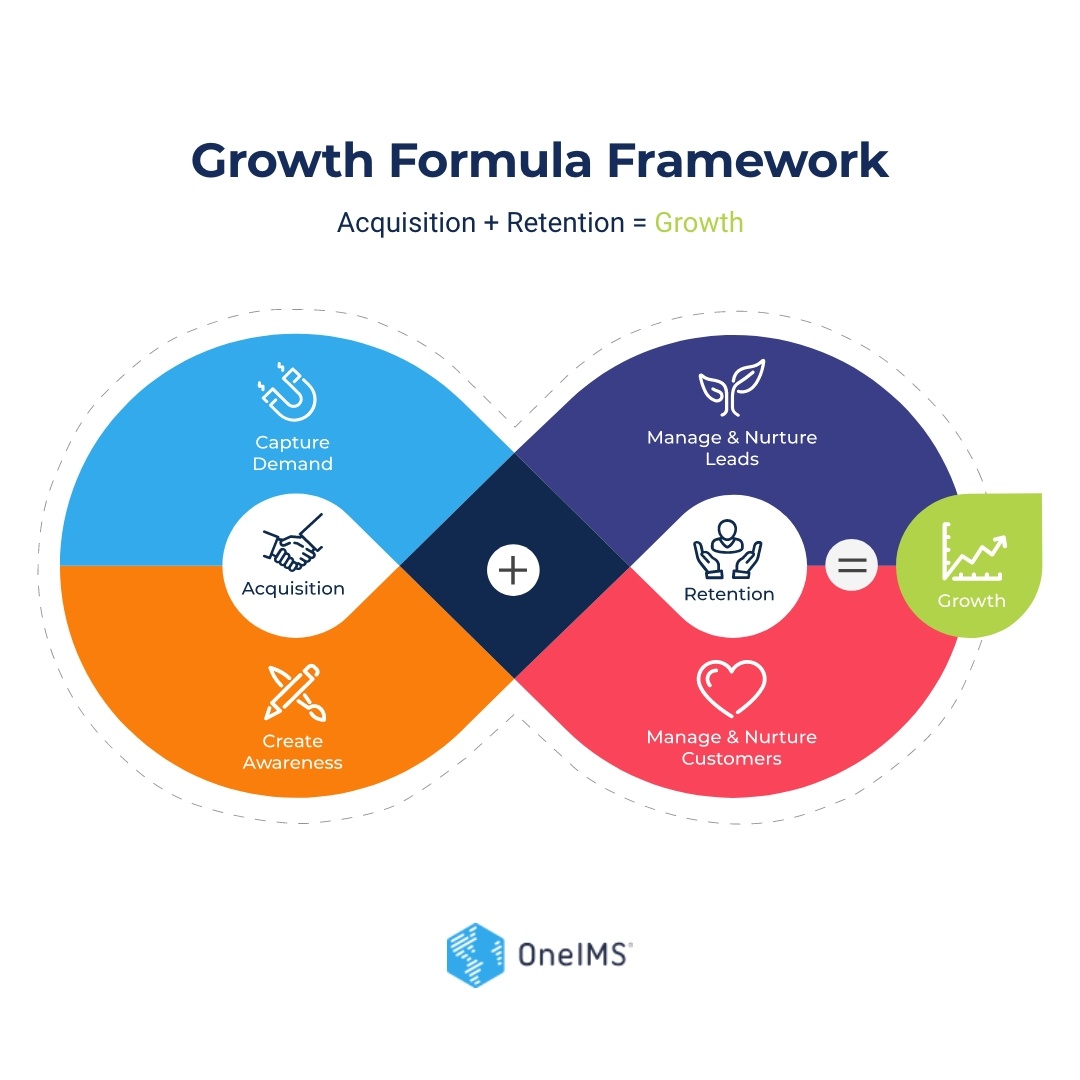
Growth Formula Framework

Growth Formula Framework

OneIMS' multiplicative growth model — the levers we pull to compound revenue across paid, owned, and earned.
AISVGPNGPDF
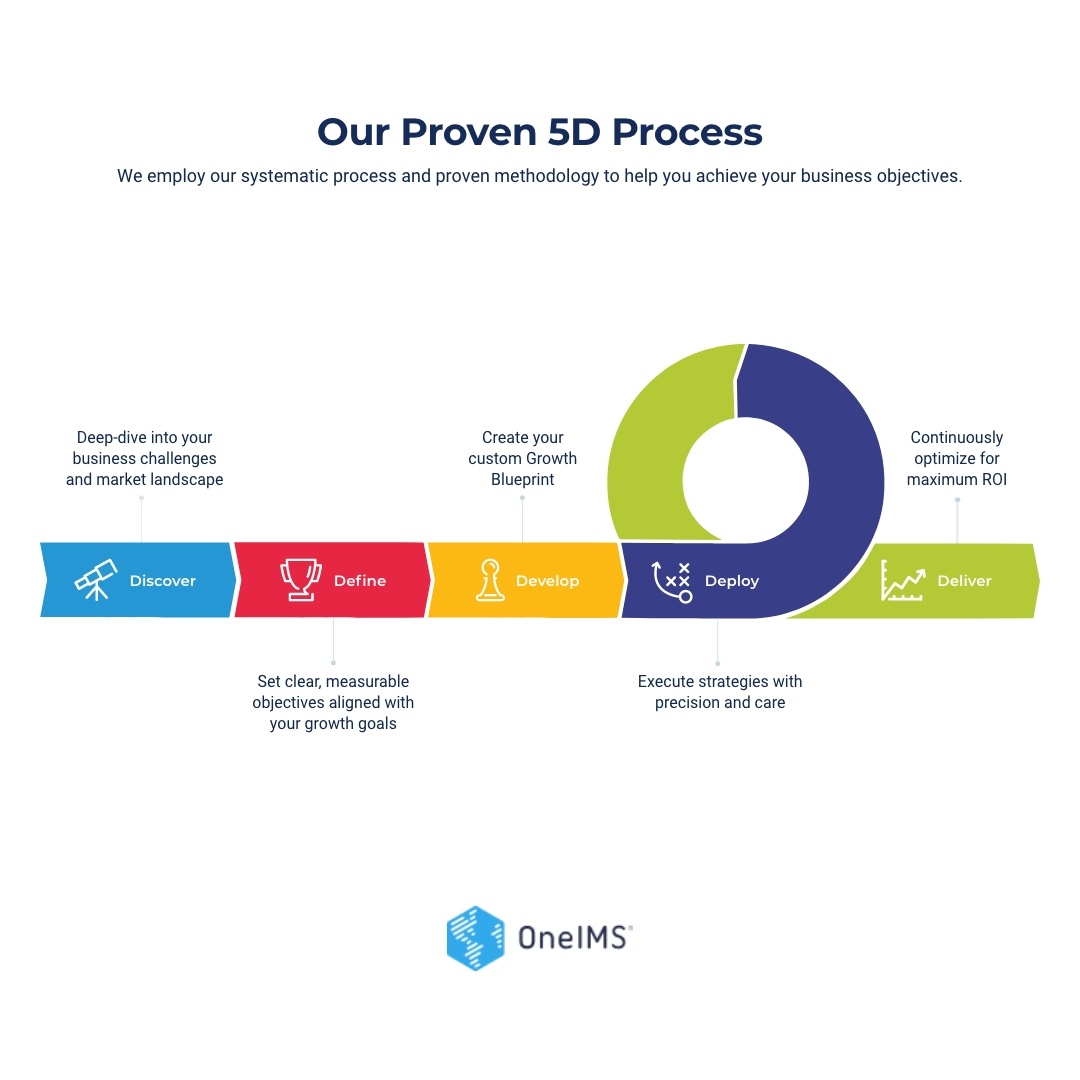
OneIMS 5D Process

The 5D Process

OneIMS' proven engagement methodology — five stages that take a partnership from discovery to compounding performance.
AISVGPNGPDF
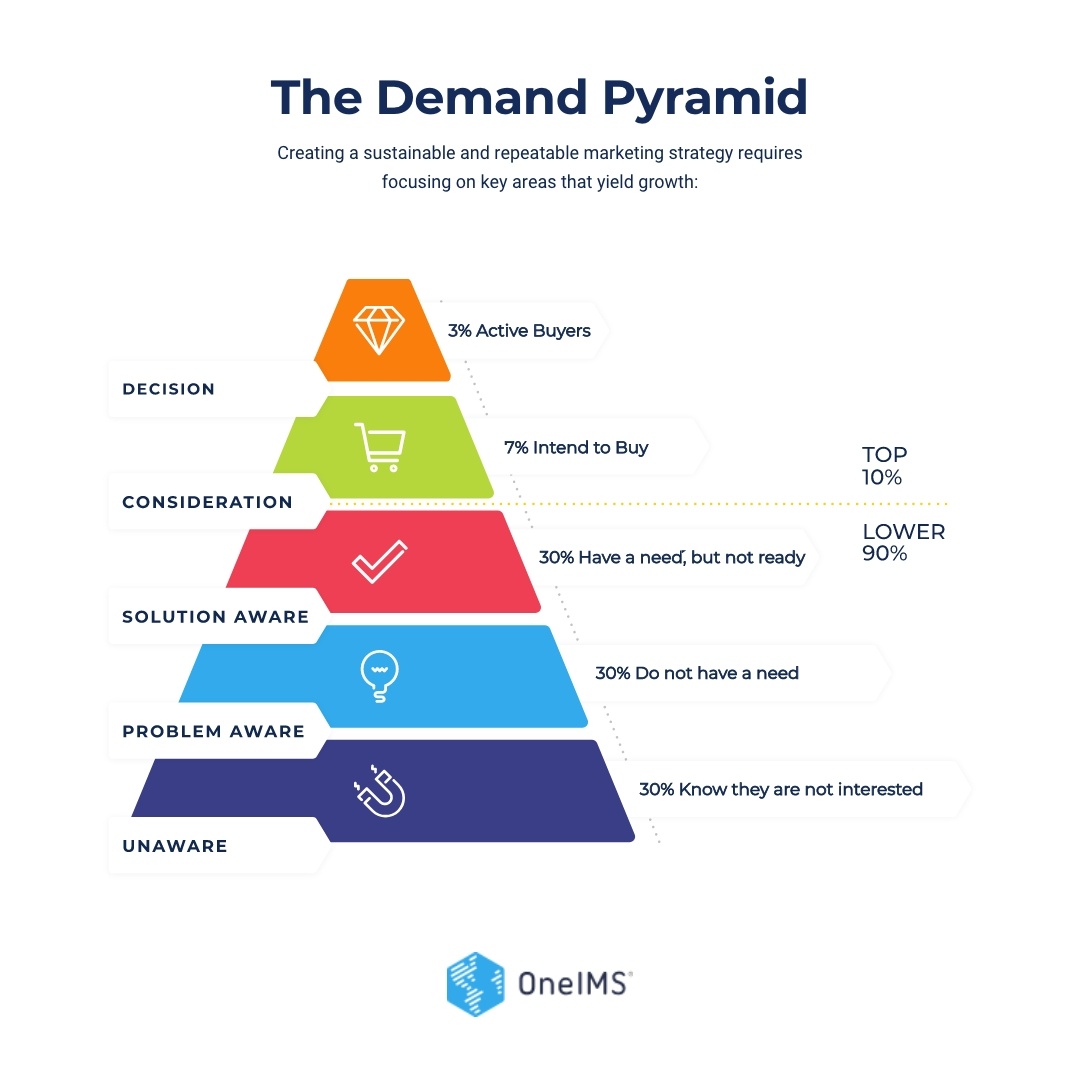
Demand Pyramid

The Demand Pyramid

The hidden architecture of B2B demand — from the 3% actively buying to the 97% still latent. Used to explain why most pipeline goes uncaptured.

AISVGPNGPDF
01
Don't redraw — download.
Every framework has an editable source. Pull from the official ZIP rather than rebuilding from a screenshot.
02
Keep typography intact.
Frameworks ship set in Source Sans Pro. Don't substitute fonts, even for "matching" a host deck template.
03
Hold the palette.
Blue, Dark Blue, and one accent. No rainbow gradients, no recoloring pillars to "match" a client.
04
Cite when external.
When a framework appears in a client deck or earned media, footer it with "© OneIMS" in small caps.

Charts that look unmistakably ours.

Data viz follows the same restraint as the rest of the system: OneIMS Blue carries the primary series, Dark Blue anchors the axis, and accents step in only for comparison or alert. Built with Chart.js and Tailwind so any team can drop these into a dashboard or deck in minutes.

AI Citation Rate
▲ 28%
34%
Brand Mentions
▲ 12%
1,284
Share of Voice
▼ 3%
22%
Pipeline Lift
▲ 18%
$472K
90-day trend

AI Citation Rate by Platform

ChatGPT Gemini Perplexity
Share of Voice

Who AI cites

  • OneIMS38%
  • Competitor A24%
  • Competitor B19%
  • Other19%
Content type performance

Citations by Content Format

Q1 Q2
Chart Color Order

Use this series order for every multi-color chart.

  1. 01 OneIMS Blue #32AAEB
  2. 02 Dark Blue #11284F
  3. 03 Accent Purple #393E87
  4. 04 Accent Orange #F97E0B
  5. 05 Accent Green #B5D73C
  6. 06 Accent Red #EF3F54
Red is reserved for negatives / alerts only — never use it as a default series color.

Templates that carry the brand into the feed.

Five platform-sized layouts that pair OneIMS patterns with a real piece of data, a real headline, and a real caption. Drop in your stat, swap the copy, ship. Each template ships with platform-tuned captions — LinkedIn long-form, X short-form, Instagram conversational.

Tap a caption tab to copy that platform's version. Download grabs a full-res PNG.

Motion templates that finish the system.

Animated frameworks, stat reveals, and lower-thirds — the visual language extended into motion. Use these as design specs: hand the looping preview and the spec block to your motion designer; the system will render identically in After Effects, Premiere, or Lottie.

Each tile loops in-page. Hand the spec — colors, easing, timing — to your motion designer.
Model
Buyer Intent
Answer
Clearly
Structure
Stay Fresh
Prove
& Place
The MAPS Framework
AI Search Readiness Loop
Framework Reveal · Title Card16 : 9 · 1920 × 1080

MAPS Framework Animated Reveal

Four chevrons cascade in over 2.5s, then the AI Search Readiness Loop lockup settles in the center. Use as a title card opener or 5-second pre-roll.

Duration
5.5s loop · 165 frames @ 30fps
Easing
cubic-bezier(0.16, 1, 0.3, 1) — emphasized out
Beats
0.4s → 1.0s → 1.6s → 2.2s · 3.0s lockup
Audio cue
Soft thump on each chevron · whoosh on lockup
Colors
#32AAEB · #F97E0B · #B5D73C · #EF3F54
Model Buyer Intent Answer Clearly Structure & Stay Fresh Prove & Place Discoverability Trust AI Search Readiness Loop Build discoverability, earn trust, grow pipeline
Framework Diagram · Featured Reveal16 : 9 · 1920 × 1080

MAPS Framework Diagram Reveal

The official MAPS framework diagram, set in motion. Background circles settle in first, the four chevrons cascade M → A → S → P, the dashed arrows draw between them, then the labels land. Use as a hero intro, webinar opener, or sales-deck title card.

Duration
3.8s reveal · builds once, holds permanently
Cascade
M 0.8s · A 1.2s · S 1.6s · P 2.0s
Easing
cubic-bezier(0.22, 1, 0.36, 1) — quiet out
Artwork
Official MAPS SVG · uses brand chevron colors
Use
Title cards · pre-roll · deck opens
ONEIMS
MAPS · DAY 90
%
AI citation rate across ChatGPT & Perplexity. From 6% in 90 days.
Swipe up · oneims.com/aeo
Reels · TikTok · Story9 : 16 · 1080 × 1920

Stat Counter Reel

Number counts 0 → target while Signal Rings pulse behind. Hand-off ships with a single tweak variable.

Duration
6s loop · 1.4s count · 4s hold
Counter
CSS counter-reset · steps(N) · linear
Rings
Stagger 0.4s · 5 rings · ease-in-out
Vars
--end (target) · --label (caption)
Colors
#11284F bg · #32AAEB accent
EP. 14 · AEO PODCAST
Solomon Thimothy
CEO·OneIMS
Podcast · Webinar · Interview16 : 9 · Lower Third

Lower-Third Speaker ID

A 2-line speaker tag pinned to the bottom-left, fronted by a thin blue accent rule. No panel, no gloss — just type, the way a clean keynote does it.

Footprint
~25% width · ~12% height · bottom-left
Duration
7s loop · 0.6s rule · 0.4s text · 4s hold · 0.6s out
Easing
cubic-bezier(0.22, 1, 0.36, 1) — quiet out
Slots
{name} {role} {episode}
Safe area
Inside 90% × 90% title-safe · 6% inset
DAY 90 · OneIMS
5.6×
growth in AI citations across
ChatGPT & Perplexity.
Carousel cover · Square loop1 : 1 · Loop

Stat Loop

A quiet, single-stat reveal in italic light type. Number rises, a five-bar growth chart steps in, caption follows. Loops every 6 seconds without ever feeling busy.

Duration
6s loop · 1.5s reveal · 4s hold · 0.5s out
Stagger
Eye 0s · Number 0.3s · × 0.7s · Rule 1.1s · Caption 1.5s
Easing
cubic-bezier(0.22, 1, 0.36, 1) — quiet out
Type
Source Sans 3 · Italic Light 300 · -5% tracking
Slots
{eyebrow} {number} {unit} {caption}
ONEIMS
BUILT FOR AI SEARCH
Get your brand cited
by the models
your buyers use.
oneims.com / aeo
Video Outro · YouTube End Card16 : 9 · End Card

The End Card

Eyebrow + headline + accent underline + URL stagger in over 2 seconds. Holds on the underline while the video resolves.

Duration
6s loop · 2s in · 3.5s hold · 0.5s out
Easing
cubic-bezier(0.22, 1, 0.36, 1) — line wipe
Stagger
Eye 0s · HL 0.5s · Line 1.2s · URL 1.8s
Variants
Dark Blue (default) · OneIMS Blue · Light haze
Logo
Wordmark top-right · never lockup
CITATIONS BY CONTENT FORMAT · Q2
What AI actually cites.
Comparison
186
FAQ / How-To
142
Interactive
124
Whitepapers
108
Case Studies
96
Animated Infographic · Cutaway16 : 9 · Infographic

Bar-Race Insight

Bars race out left-to-right with a 0.2s stagger between rows. Numbers and labels hold; bars retract on loop. Use as a 7-second video cutaway.

Duration
7s loop · 1.4s race in · 4.5s hold
Easing
cubic-bezier(0.65, 0, 0.35, 1) — in-out
Stagger
0.2s between bars · top-down
Color order
#32AAEB · #11284F · #393E87 · #F97E0B · #B5D73C
Data slot
5 rows {label, value, --w 0–1}

Get these into Adobe Premiere

Each card ships with a Still PNG, a Spec JSON, and the source SVG where the stage is vector. Drag the SVG straight into Premiere as a graphics layer, or feed the spec to a motion designer to bake a real .mogrt in After Effects. The result drops into any Premiere project with editable text and color tokens already wired.

01 Download Still + Spec 02 Open in After Effects 03 Export as .mogrt 04 Import to Premiere · Essential Graphics

We sound like experts who get it.

Plain, direct, occasionally sharp. We earn authority by saying the useful thing — not the safe thing. Four traits anchor every piece of OneIMS writing, from a 60-second LinkedIn post to a 60-page playbook.

C

Clear

Lead with the answer. Elaborate after. If a sentence doesn't earn its keep, cut it.

C

Confident

We have the data and the scars. We say what we believe — not "it depends" hedges.

C

Concrete

Numbers, names, examples. "+18% pipeline in 90 days" beats "drive growth at scale."

C

Curious

We treat marketing as a moving system, not a settled one. We test, learn, and say so.

Dimension
Don't say
Do say
Outcomes
Drive growth at scale
+18% qualified pipeline in 90 days
Audience
Forward-thinking leaders
B2B marketing & revenue ops teams
Action
Reach out to discuss further
Book a 30-min strategy call
Authority
Best-in-class methodology
Proven 5D Process · Growth Formula
© 2026 OneIMS — An Internet Marketing Company. Brand Guideline v2026.